
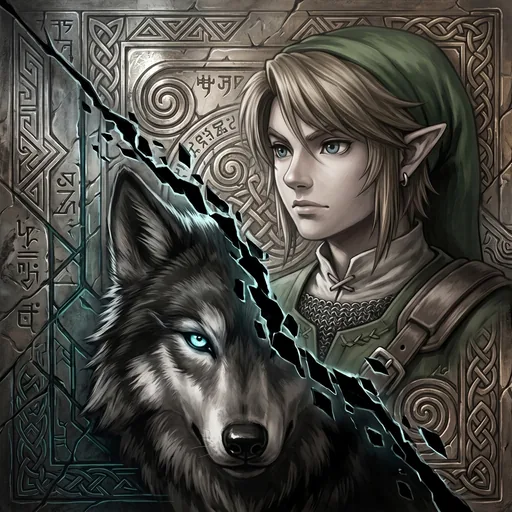
Dusklight
Gary RichesUpdated
- v1.0.0
- 36 MB
- GPL-3.0
- zip
Dusklight for PlayStation 5: a homebrew port on RADV (Aurora, Dawn WebGPU, SDL3). Bring your own disc image.
Release notes
Version 1.0, with new home-screen art. Built from upstream Dusklight revision 34a144a493, the latest on its main, as v0.3.0 was.
Changed
- New home-screen art. The icon, the background behind the title and the splash while it starts are a new picture in the spirit of the game's own cover: a young swordsman and a black wolf, split by a seam of twilight, over carved stone in silver and sepia. The background and the splash are now the same picture.
- Version 1.0. The program is the same as v0.3.0's: upstream Dusklight has nothing newer to take.
Install or update
- Unpack
Dusklight-PS5-v1.0.0.zip. It holds one folder,PPSA99305. - Copy that folder to the console as
/data/homebrew/PPSA99305/, over the old one if you have an earlier version. Your disc image, saves, settings and texture packs in that folder are left alone. - New install only: copy your own GameCube disc image (
.isoor.ciso) into the same folder. - Start "Dusklight" from the home screen. If the home screen keeps the old icon, remove the title from the home screen and let ShadowMountPlus add it again: the folder and its data are kept.
No game data is in this download. The README has the details.
Not verified
The new art has not yet been seen on the console's home screen. Sound, the full controller mapping and long sessions remain unconfirmed.
Source
A built title is under GPL-3.0. SOURCE.txt in the zip names the revision of every part it was built from; this port's is 577c762.
Dusklight-PS5-v1.0.0.zip sha256: 343f8829803ecba03e8cf3168f543543771e6511dfec4e6761c60bb6f4ab8e8d
Written by Gary Riches for v1.0.0. See this release on GitHub
Comments
Safety
- Stays in the sandbox
- Built by the developer
The scan found no way for this app to reach beyond its own files: no payload, no connection to the payload loader, no request to a jailbreak service.
The developer built and uploaded this file by hand. Nothing ties it to the published source.
From an automatic scan of the release file, which is read and never run. It can miss things: it is not a guarantee. How the scan works
Install
Read the release notes and the project's documentation first. Some apps need extra setup, such as a payload, configuration or additional files, and the developer's instructions take precedence over the general steps below.
- Download
Dusklight-PS5-v1.0.0.zipand extract it on your computer. - Copy the extracted
PPSA99305/folder to/data/homebrew/on your PS5, for example over FTP. - A loader such as ShadowMountPlus picks it up. Launch Dusklight from the home screen.
Verify
This listing is pinned to one exact file. sha256sum Dusklight-PS5-v1.0.0.zip must print:
343f8829803ecba03e8cf3168f543543771e6511dfec4e6761c60bb6f4ab8e8dThis app and its content are the responsibility of its developer, Gary Riches. Homebrew runs with elevated access on a jailbroken console; install only what you trust.
Source
griches/PS5_DusklightRelease v1.0.0
Details
- Title ID
- PPSA99305
- Category
- Console game ports
- Version
- 1.0.0
- Format
- ZIP folder
- License
- GPL-3.0
- File
- Dusklight-PS5-v1.0.0.zip
- Updated
No comments yet. Write the first one on GitHub.
Comment on GitHub